


Full Stack Web Technologies: A Technical Implementation Guide
Explore the roles of HTML, CSS, JavaScript, PHP, and XML in modern web architecture. Detailed workflows and frontend vs backend technical breakdowns.
Full Stack Web Technologies
Technical Overview & Implementation Workflow
System Architecture
client-side-rendering
The Client (Browser): Responsible for presenting the interface (HTML/CSS) and handling immediate user interactions (JS).
The Server (Backend): Processes logic (PHP), communicates with databases, and returns data (XML/JSON) to the client.
HTML: The Semantic Structure
Role: Defines the structure and semantic meaning of content.
<form id="loginForm"> <label>Email:</label> <input type="email" name="email" required> <button type="submit">Login</button> </form>
HyperText Markup Language (HTML) is the standard markup language for documents designed to be displayed in a web browser.
<!DOCTYPE html> <html> <head> <title>Page Title</title> </head> <body> <header> <h1>Welcome to My Website</h1> </header> <section> <p>This is a paragraph of text.</p> <img src="image.jpg" alt="Description"> </section> </body> </html>
CSS3: Styling & Layout
Role: Controls presentation, layout, colors, and responsiveness.
#loginForm { display: flex; flex-direction: column; padding: 20px; background-color: #f0f0f0; border-radius: 8px; }
Cascading Style Sheets (CSS) describe how HTML elements are to be displayed on screen, paper, or in other media.
body { font-family: Arial, sans-serif; background-color: #f0f0f0; } .container { max-width: 1200px; margin: 0 auto; padding: 20px; display: flex; justify-content: space-between; } button.primary { background-color: #007bff; color: white; border: none; padding: 10px 20px; }
JavaScript: Logic & Interactivity
Role: Enables interactivity, validation, and dynamic updates without reloading.
document.getElementById('loginForm') .addEventListener('submit', (e) => { e.preventDefault(); let email = e.target.email.value; if(!email.includes('@')) alert('Error!'); else sendData(email); });
JavaScript is a programming language that enables interactive web pages and is an essential part of web applications.
const button = document.getElementById('myBtn'); button.addEventListener('click', function() { const input = document.getElementById('username'); if(input.value === '') { alert('Please enter a username!'); } else { console.log('User logged in: ' + input.value); // Logic to send data to server would go here } });
PHP: Server-Side Logic
<?php $email = $_POST['email']; // Process data (e.g. check DB) header('Content-Type: text/xml'); echo "<response> <status>success</status> <msg>Logged in as $email</msg> </response>"; ?>
Executes on the server, not the user's browser.
Connects to databases (MySQL) to store or retrieve user data.
PHP: Server-Side Processing
PHP (Hypertext Preprocessor) is a widely-used open source general-purpose scripting language that is especially suited for web development.
<?php $servername = "localhost"; $username = "root"; $password = ""; // Create connection $conn = new mysqli($servername, $username, $password); // Check connection if ($conn->connect_error) { die("Connection failed: " . $conn->connect_error); } echo "Connected successfully"; ?>
XML: Data Transport
Extensible Markup Language (XML) is a markup language that defines a set of rules for encoding documents in a format that is both human-readable and machine-readable.
<!-- The Server Response --> <response> <status>success</status> <user> <id>1042</id> <role>admin</role> </user> </response>
<?xml version="1.0" encoding="UTF-8"?> <employees> <employee> <id>101</id> <name>John Doe</name> <role>Developer</role> <department>Engineering</department> </employee> <employee> <id>102</id> <name>Jane Smith</name> <role>Designer</role> <department>Product</department> </employee> </employees>
Example Workflow: Form Submission
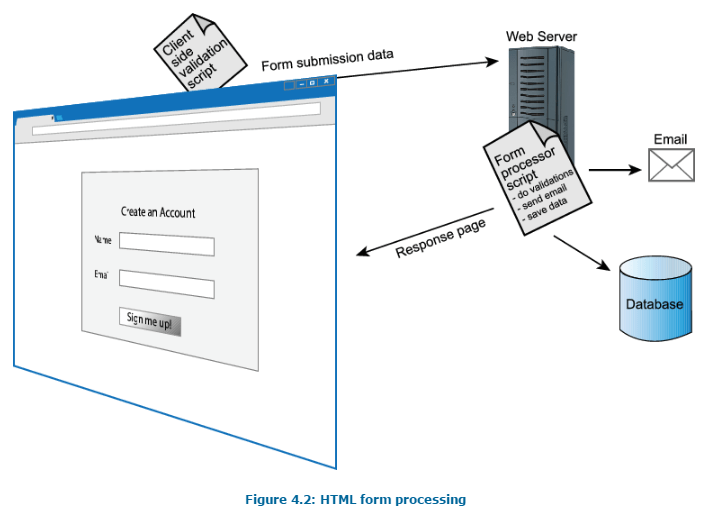
1. User fills HTML Form
2. CSS Styles the layout
3. JS Validates & Sends
4. PHP Processes Data
5. XML Returns Status
A typical web request involves the client sending data and the server processing it. Here is the interaction flow.
Putting It All Together
Frontend Developer
Masters HTML, CSS, JavaScript. Focuses on user experience and visual interface.
Backend Developer
Focuses on PHP, Databases, XML/API logic. Ensures security and data integrity.
Full Stack Developer
Connects both worlds. Understands the entire lifecycle from browser to server.
Industry Adoption (Stack Overflow Survey)
JavaScript dominates the modern web, while PHP remains a strong backend choice for 77% of the web (CMS market). XML persists in enterprise configurations.
Industry Roles & Conclusion
- web-development
- full-stack
- html5
- css3
- javascript
- php
- system-architecture
- coding-basics