


Made byBobr AI

Autodesk Construction Cloud Implementation & ISO 19650

Learn how to optimize portfolio management using Autodesk Construction Cloud (ACC) with an ISO 19650 compliant framework and standardized CDE workflows.

#autodesk-construction-cloud#iso-19650#common-data-environment#bim#construction-management#digital-transformation
Watch
Pitch
Abstract architectural wireframe blending into a clean digital blue cloud network data stream, corporate style, high tech, white and blue minimalist

Strategic Portfolio Information Management

ACC Implementation Framework & ISO 19650 Compliance

Portfolio Delivery Team

January 2026

Made byBobr AI

Executive Summary

The Challenge: Digital Fragmentation

  • Data Silos: Disconnected project data reduces portfolio visibility.
  • Version Conflict: 35% of rework caused by outdated documentation.
  • Compliance Risk: Inconsistent ISO 19650 adherence across supply chain.

The Solution: Unified CDE

  • Single Source of Truth: Centralized Autodesk Construction Cloud (ACC) repository.
  • Standardized Workflows: Hard-coded naming conventions and approval gates.
  • Connected Analytics: Real-time cross-project insights via Insight & Power BI.
Isometric illustration of a central digital hub connecting multiple construction sites, clean white and blue 3d render, corporate minimalist
Made byBobr AI

CDE Architecture: Portfolio Topology

Hub-to-hub Connectivity Model
Owner / Client
Portfolio ACC Hub
Project A Container
Design Team Hub
ACC Bridge Sync
Project B Container
Contractor Hub
ACC Bridge Sync
Made byBobr AI

Standardized Project Template

📁 Project Files (Root)
├ 📁 00 - GUIDANCE & STANDATDS
├ 00.01 - ACC Manual & Protocols
└ 00.02 - Naming Strategy
├ 📁 01 - WIP (Task Teams)
├ 10 - Architecture
├ 20 - Structural
└ 30 - MEP Services
├ 📁 02 - SHARED (Coordination)
├ 📁 03 - PUBLISHED (Client)
├ 03.01 - Design Stage Approval
└ 03.02 - Construction Issue
└ 📁 04 - ARCHIVED

Standardized Project Template & Guidance

For a portfolio of 100+ projects, a rigorous folder template is critical. The "00 - Guidance" folder ensures every project team has immediate access to the latest protocols directly within the CDE.

00 - Guidance & Admin

Single source of truth. Stores the BIM Execution Plan, ACC Manual, and Naming Conventions. Managed centrally by the Client Information Manager.

01 - Work In Progress (WIP)

Access restricted to Task Teams. Includes sub-folders for each discipline (Arch, Struct, MEP) to manage their day-to-day data.

02 - Shared

Verified geometry and data shared for coordination. Files here must pass automated 'naming validator' logic.

03 - Published

Contractual record deliverables. Fixed versions representing 'End of Stage' or 'For Construction' milestones.

Made byBobr AI

Managing Portfolio Guidance & Governance

Centralized Knowledge Hub

Maintain a master "ACC Guidance" project in the cloud that syncs the latest manuals only to the '00-Guidance' folders of all 100+ active projects using ACC Bridge or a proprietary script.

The "Template Project" Strategy

Never create projects from scratch. Maintain a 'Live Master Template' with pre-configured folder trees, permission groups, and issues types. Clone this for every new project to ensure 100% compliance at start.

Governance & Audit

Implement a quarterly "Health Check" where the Digital Lead audits 10 random projects against the governance standard, issuing a compliance score.

Guidance Distribution Workflow
Master ACC Manual
Maintained by Portfolio Team
Sync via Bridge / APIs
Project 001
00-Guidance
Project 002
00-Guidance
Project ...
00-Guidance
Made byBobr AI

Standard Naming Convention (ISO 19650 Core)

PRJ – ARC – 01 – ZZ – DR – A – 00101
Project
PRJ
Originator
Architect (ARC)
Volume
Site 01
Level
Multiple (ZZ)
Type
Drawing (DR)
Discpl.
Arch (A)
Number
Sequential
*Metadata fields in ACC strictly enforce this syntax upon upload
Made byBobr AI

Roles & Permissions Matrix

Role / ModuleDocs (Admin)Design (Collab)Build (RFI)Cost (View)
Client / Owner✔ FullView Only✔ View All✔ Full
Lead Appointed Party (Arch)✔ Full (WIP)✔ Create✔ View/Answer
Task Team (Engineer)⚠ Edit (Own Only)✔ Consume
Contractor✔ Upload (Shared)View Only✔ Create/ManageView (Limited)
Auditor / Info Manager✔ Full Control✔ Watch✔ Watch✔ View All

Governance Note: Permissions are assigned by Role (Company level) rather than individual user to reduce administrative overhead.

Made byBobr AI

Multi-Tier Supply Chain Management

Information delivery cascade from Appointing Party to Task Teams.

Appointing Party
(Client / Owner)
Lead Appointed Party
(Main Contractor / Lead Designer)
Appointed Party A
(MEP Sub)
Appointed Party B
(Facade Sub)
Appointed Party C
(Landscape)
Made byBobr AI

RIBA Stage Mapping to ACC Modules

0-1
Definition
Docs/Planning
2-3
Design
Design Collab
4
Tech Design
Model Coord
5
Build
ACC Build
6-7
Handover
Tandem / Ops

Deliverable Mapping

Stages 0-1 (Strat. Def / Prep): ACC Docs set up, BEP storage.
Stage 2-3 (Concept / Spatial): Design Collaboration, WIP Exchange.
Stage 4 (Technical): Model Coordination, Clash Detection.
Stage 5 (Construction): ACC Build, RFIs, Submittals, Assets.
Stage 6-7 (Handover / Use): As-Built export, Ops integration.

Made byBobr AI

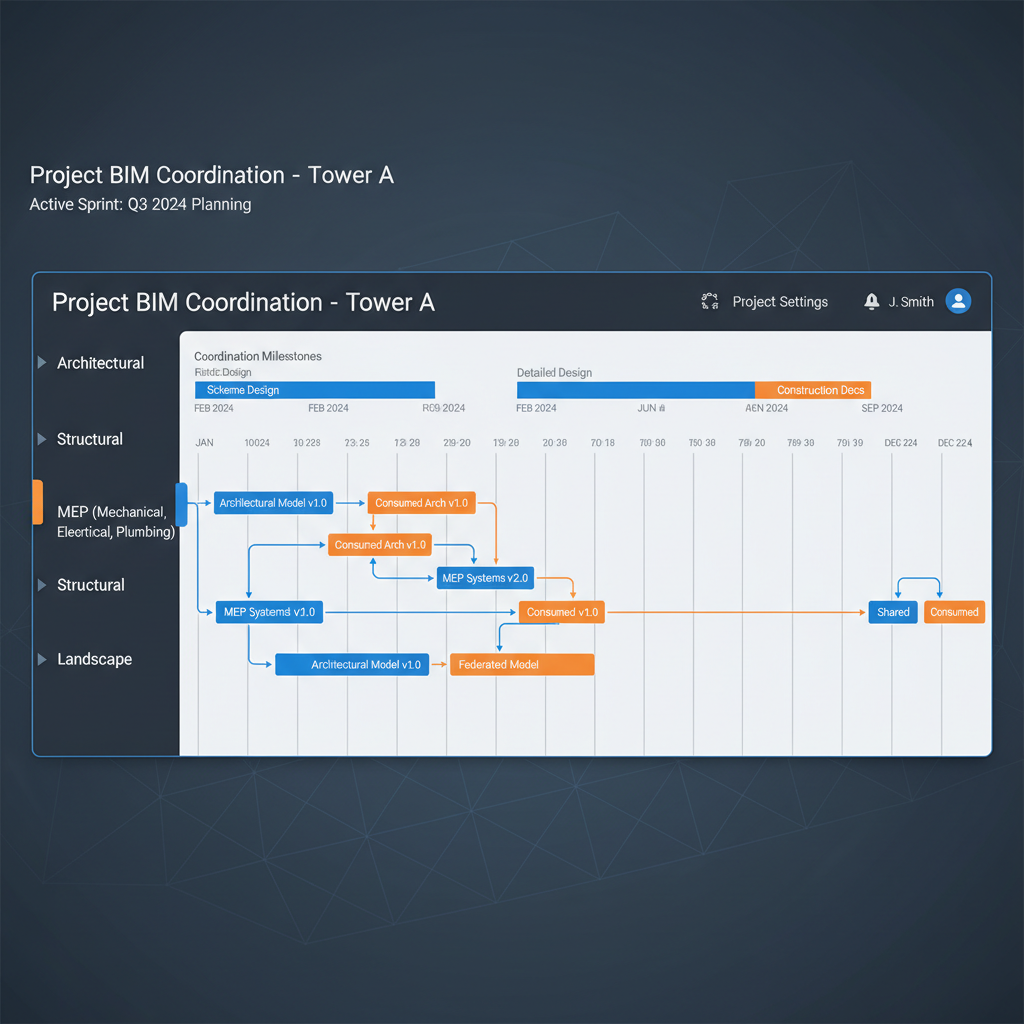
Design Collaboration Module

  • Swimlanes: Visual timeline of package exchanges per team.
  • Consume Workflow: Controlled ingestion of other teams' WIP into your environment.
  • Issue Tracking: 3D-context issues assigned directly in the viewer.
Software interface mockup of BIM model coordination swimlanes, timeline showing packages shared and consumed, professional Autodesk style
Made byBobr AI

Build Module Configuration

RFIs (Request for Info)

Standardized workflow with defined Reviewers and Co-reviewers. Mandatory linking to Sheets/Models.

  • Manager: Architect
  • Reviewer: Consultants
  • Timeframe: 5 Days

Submittals

Packages of spec data required for approval before fabrication. Tracked against specification sections.

  • Status: Open, Approved, Revise
  • Ball-in-court logic

Forms & Checklists

Daily Logs, Safety Inspections, and QA/QC checklists digitized for mobile access.

  • Digital Signatures
  • Photo Mandatory settings
  • Weather Integration
Made byBobr AI

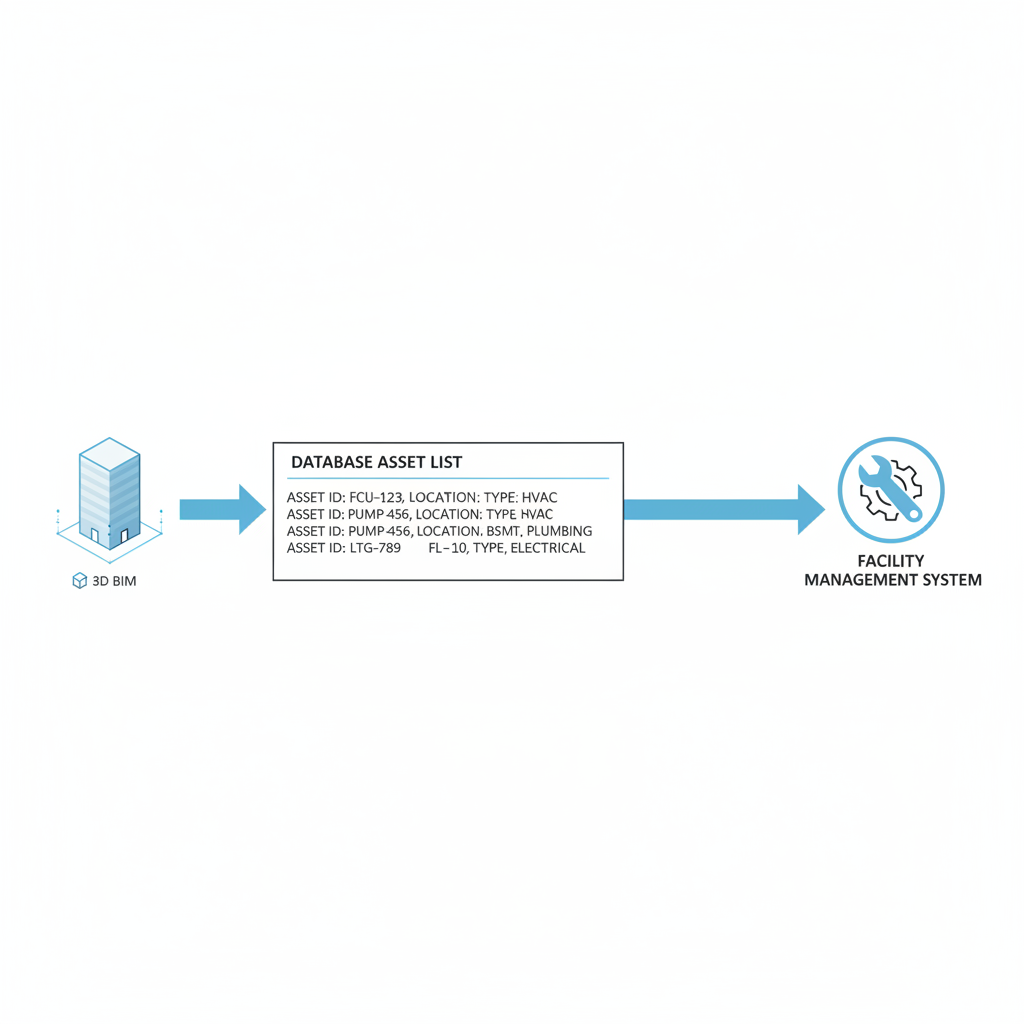
Asset Information Requirements (AIR) Flow

Diagram showing data moving from a 3D BIM model to a database list of assets and then to a facility management icon, clean white background, technical flowchart

Data Capture Strategy: Assets are identified in the Design model (Revit) using classification codes (Uniclass/Omniclass). These synchronize to the 'Assets' module in Build, where contractors attach manuals, photos, and commissioning data via mobile tablets.

Made byBobr AI

Document Control & Status Codes

Approval workflows in ACC automate the movement of files between statuses.

We utilize the Review tool to enforce:

  • Initiator (Task Team)
  • Reviewer (Lead Appointed Party)
  • Approver (Client/PM)

ISO 19650 Status Codes

S0 WIP - Work in Progress
S1 SHARED - Coordination
S2 SHARED - For Information
S3 SHARED - For Review / Comment
S4 PUBLISHED - For Stage Approval
A5 PUBLISHED - Construction
Made byBobr AI

ACC Interface Configuration

Project Home
Docs
Files
Reviews
Transmittals
Issues
Design Collaboration
Model Coordination
Project Files > 01-WIP > Architecture
NameDescriptionVersionStatusRev Date
PRJ-ARC-L01-DR.pdfFloor Plan L01V3S0Jan 14
PRJ-ARC-L02-DR.pdfFloor Plan L02V2S0Jan 12
Made byBobr AI

Portfolio Reporting Dashboard

Chart

Executive KPIs

  • RFI Turnaround: 4.2 Days (Target: 5)
  • Cloud Adoption: 98% of Team
  • Model Current: 92% Weekly Sync
Chart
Made byBobr AI

Implementation Roadmap

Phase 1: Setup

Months 0-2

  • Define Account Admin Roles
  • Configure Project Templates
  • Establish ISO Naming Standard
  • Onboard Lead Consultants

Phase 2: Pilot

Months 3-5

  • Launch 2 "Lighthouse" Projects
  • Test Model Coordination workflows
  • Refine Review approval gates
  • Gather User Feedback

Phase 3: Rollout

Month 6+

  • Mandate ACC for all new projects
  • Integrate with Power BI / ERP
  • Subcontractor Mobile Training
  • Annual Audit Cycle
Made byBobr AI
Bobr AI

DESIGNER-MADE
PRESENTATION,
GENERATED FROM
YOUR PROMPT

Create your own professional slide deck with real images, data charts, and unique design in under a minute.

Generate For Free

Autodesk Construction Cloud Implementation & ISO 19650

Learn how to optimize portfolio management using Autodesk Construction Cloud (ACC) with an ISO 19650 compliant framework and standardized CDE workflows.

Strategic Portfolio Information Management

ACC Implementation Framework & ISO 19650 Compliance

The Challenge: Digital Fragmentation

<ul><li><strong>Data Silos:</strong> Disconnected project data reduces portfolio visibility.</li><li><strong>Version Conflict:</strong> 35% of rework caused by outdated documentation.</li><li><strong>Compliance Risk:</strong> Inconsistent ISO 19650 adherence across supply chain.</li></ul>

The Solution: Unified CDE

<ul><li><strong>Single Source of Truth:</strong> Centralized Autodesk Construction Cloud (ACC) repository.</li><li><strong>Standardized Workflows:</strong> Hard-coded naming conventions and approval gates.</li><li><strong>Connected Analytics:</strong> Real-time cross-project insights via Insight & Power BI.</li></ul>

CDE Architecture: Portfolio Topology

Hub-to-hub Connectivity Model

Standardized Project Template & Guidance

Access restricted to Task Teams. Includes sub-folders for each discipline (Arch, Struct, MEP) to manage their day-to-day data.

Verified geometry and data shared for coordination. Files here must pass automated 'naming validator' logic.

Contractual record deliverables. Fixed versions representing 'End of Stage' or 'For Construction' milestones.

Archived: Journal of information transactions. Audit trail for legal and historical record.

Single source of truth. Stores the BIM Execution Plan, ACC Manual, and Naming Conventions. Managed centrally by the Client Information Manager.

Managing Portfolio Guidance & Governance

Standard Naming Convention (ISO 19650 Core)

PRJ – ARC – 01 – ZZ – DR – A – 00101

Roles & Permissions Matrix

Multi-Tier Supply Chain Management

Information delivery cascade from Appointing Party to Task Teams.

RIBA Stage Mapping to ACC Modules

<strong>Stages 0-1 (Strat. Def / Prep):</strong> ACC Docs set up, BEP storage.<br><strong>Stage 2-3 (Concept / Spatial):</strong> Design Collaboration, WIP Exchange.<br><strong>Stage 4 (Technical):</strong> Model Coordination, Clash Detection.<br><strong>Stage 5 (Construction):</strong> ACC Build, RFIs, Submittals, Assets.<br><strong>Stage 6-7 (Handover / Use):</strong> As-Built export, Ops integration.

Design Collaboration Module

<ul><li><strong>Swimlanes:</strong> Visual timeline of package exchanges per team.</li><li><strong>Consume Workflow:</strong> Controlled ingestion of other teams' WIP into your environment.</li><li><strong>Issue Tracking:</strong> 3D-context issues assigned directly in the viewer.</li></ul>

Build Module Configuration

Asset Information Requirements (AIR) Flow

<strong>Data Capture Strategy:</strong> Assets are identified in the Design model (Revit) using classification codes (Uniclass/Omniclass). These synchronize to the 'Assets' module in Build, where contractors attach manuals, photos, and commissioning data via mobile tablets.

Document Control & Status Codes

<div style='display:flex; flex-direction:column; gap:15px;'><div style='display:flex; align-items:center;'><span style='background:#ccc; color:#000; padding:5px 15px; font-weight:bold; width:50px; text-align:center; border-radius:4px; margin-right:20px;'>S0</span> <span>WIP - Work in Progress</span></div><div style='display:flex; align-items:center;'><span style='background:#FFD700; color:#000; padding:5px 15px; font-weight:bold; width:50px; text-align:center; border-radius:4px; margin-right:20px;'>S1</span> <span>SHARED - Coordination</span></div><div style='display:flex; align-items:center;'><span style='background:#FFD700; color:#000; padding:5px 15px; font-weight:bold; width:50px; text-align:center; border-radius:4px; margin-right:20px;'>S2</span> <span>SHARED - For Information</span></div><div style='display:flex; align-items:center;'><span style='background:#0696D7; color:#fff; padding:5px 15px; font-weight:bold; width:50px; text-align:center; border-radius:4px; margin-right:20px;'>S3</span> <span>SHARED - For Review / Comment</span></div><div style='display:flex; align-items:center;'><span style='background:#2ba84a; color:#fff; padding:5px 15px; font-weight:bold; width:50px; text-align:center; border-radius:4px; margin-right:20px;'>S4</span> <span>PUBLISHED - For Stage Approval</span></div><div style='display:flex; align-items:center;'><span style='background:#2ba84a; color:#fff; padding:5px 15px; font-weight:bold; width:50px; text-align:center; border-radius:4px; margin-right:20px;'>A5</span> <span>PUBLISHED - Construction</span></div></div>

ACC Interface Configuration

Portfolio Reporting Dashboard

<ul><li><strong>RFI Turnaround:</strong> 4.2 Days (Target: 5)</li><li><strong>Cloud Adoption:</strong> 98% of Team</li><li><strong>Model Current:</strong> 92% Weekly Sync</li></ul>

Implementation Roadmap

  • autodesk-construction-cloud
  • iso-19650
  • common-data-environment
  • bim
  • construction-management
  • digital-transformation