


Made byBobr AI

Visualizing AWS EC2 Network Traffic and Packet Flows

Learn how AWS network traffic flows between public and private subnets, NAT Gateways, and IGWs with this technical architectural visualization.

#aws#ec2#vpc#networking#nat-gateway#security-groups#cloud-architecture#traffic-flow

AWS Network Traffic Simulation

Visualizing Packet Flows: Intra-VPC and Internet Egress

Made byBobr AI

Architecture Topology

1. VPC Configuration

Single VPC with split subnets to separate traffic concerns.

2. Public Zone

Public Subnet: Contains Instance A & B (Web/App Layer). Direct Internet Gateway access.

3. Private Zone

Private Subnet: Contains Instance C (Backend/DB). Routed through NAT Gateway.

Made byBobr AI

Component Legend & Roles

AWS EC2 orange cube icon isolated white background

EC2 Instances (A, B, C)

Virtual servers performing compute tasks. A & B are public facing; C is internal.

AWS NAT Gateway icon

NAT Gateway

Network Address Translation. Allows Instance C to send packets out without accepting incoming connections.

AWS Internet Gateway icon or simple cloud icon

External Service / Internet

Generic 3rd party API or SaaS platform receiving requests from our infrastructure.

Made byBobr AI

Flow 1: Same Subnet (A ↔ B)

Direct communication within the Local VPC CIDR. No gateway required. Latency is minimal.

simple server icon flat style vector
Instance A
10.0.1.10
simple server icon flat style vector
Instance B
10.0.1.20
Request (Blue)
Response (Green)
Made byBobr AI

Flow 2: Public to Private (A ↔ C)

Traffic crosses subnet boundaries via the main VPC Router. Instance A connects to Instance C's private IP (e.g., Database access).

  • Source: Public Subnet
  • Dest: Private Subnet
  • Routed locally (10.0.0.0/16)
VPC Boundary
Instance A
Public
Instance C
Private
Made byBobr AI

Cross-Subnet Animation

simple server icon vector
Inst A (Public)
10.0.1.10
simple server icon vector
Inst C (Private)
10.0.2.10
NACL Rules: Allow All Internal Traffic
Made byBobr AI

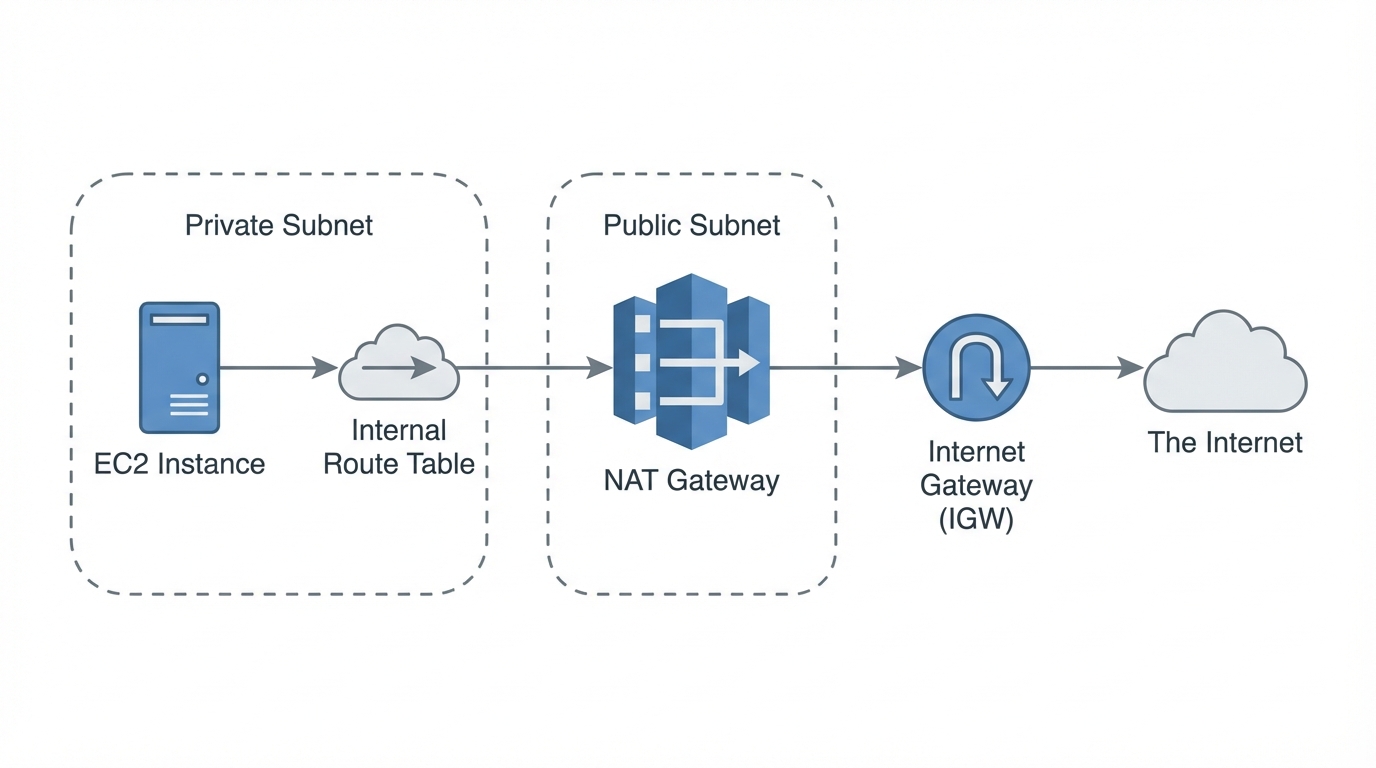
Egress flow: The NAT Gateway

  • Problem: Private instances have no public IP address.
  • Solution: Route 0.0.0.0/0 traffic to NAT Gateway in the Public Subnet.
  • Result: NAT Gateway replaces source IP with its own Elastic IP before hitting the Internet.
Diagram of AWS NAT Gateway logic, simple schematic, private to public connection
Made byBobr AI

Flow 3: Instance C ↔ External Service

Instance C

AWS NAT Gateway icon
NAT Gateway
Internet Gateway
cloud icon symbolExternal API

Blue = Outbound Request | Green = Inbound Response

Made byBobr AI

Security Controls (Security Groups)

Public Layer

Instance A/B SG: Allow Inbound HTTP (80) from 0.0.0.0/0. outbound All.

Private Layer

Instance C (Private) SG: Allow Inbound only from Instance A/B SG ID.

shield security icon modern 3d render
Made byBobr AI

Summary & Key Takeaways

Internal Communication: Fast, secure, stays within local VPC network.
External Communication: Public instances use IGW; Private instances require NAT.
Security: Use minimal Security Group rules to restrict flow directions.
Made byBobr AI
Bobr AI

DESIGNER-MADE
PRESENTATION,
GENERATED FROM
YOUR PROMPT

Create your own professional slide deck with real images, data charts, and unique design in under a minute.

Generate For Free

Visualizing AWS EC2 Network Traffic and Packet Flows

Learn how AWS network traffic flows between public and private subnets, NAT Gateways, and IGWs with this technical architectural visualization.

AWS Network Traffic Simulation

Visualizing Packet Flows: Intra-VPC and Internet Egress

Architecture Topology

Single VPC with split subnets to separate traffic concerns.

Public Subnet: Contains Instance A & B (Web/App Layer). Direct Internet Gateway access.

Private Subnet: Contains Instance C (Backend/DB). Routed through NAT Gateway.

Component Legend & Roles

Flow 1: Same Subnet (A ↔ B)

Direct communication within the Local VPC CIDR. No gateway required. Latency is minimal.

Flow 2: Public to Private (A ↔ C)

Traffic crosses subnet boundaries via the main VPC Router. Instance A connects to Instance C's private IP (e.g., Database access).

Cross-Subnet Animation

Egress flow: The NAT Gateway

Problem: Private instances have no public IP address.

Solution: Route 0.0.0.0/0 traffic to NAT Gateway in the Public Subnet.

Result: NAT Gateway replaces source IP with its own Elastic IP before hitting the Internet.

Flow 3: Instance C ↔ External Service

Security Controls (Security Groups)

Instance A/B SG: Allow Inbound HTTP (80) from 0.0.0.0/0. outbound All.

Instance C (Private) SG: Allow Inbound only from Instance A/B SG ID.

Summary & Key Takeaways

Internal Communication: Fast, secure, stays within local VPC network.

External Communication: Public instances use IGW; Private instances require NAT.

Security: Use minimal Security Group rules to restrict flow directions.

  • aws
  • ec2
  • vpc
  • networking
  • nat-gateway
  • security-groups
  • cloud-architecture
  • traffic-flow